
Checkout Page
Turn "transfer to this IBAN and email us a screenshot" into a scan.
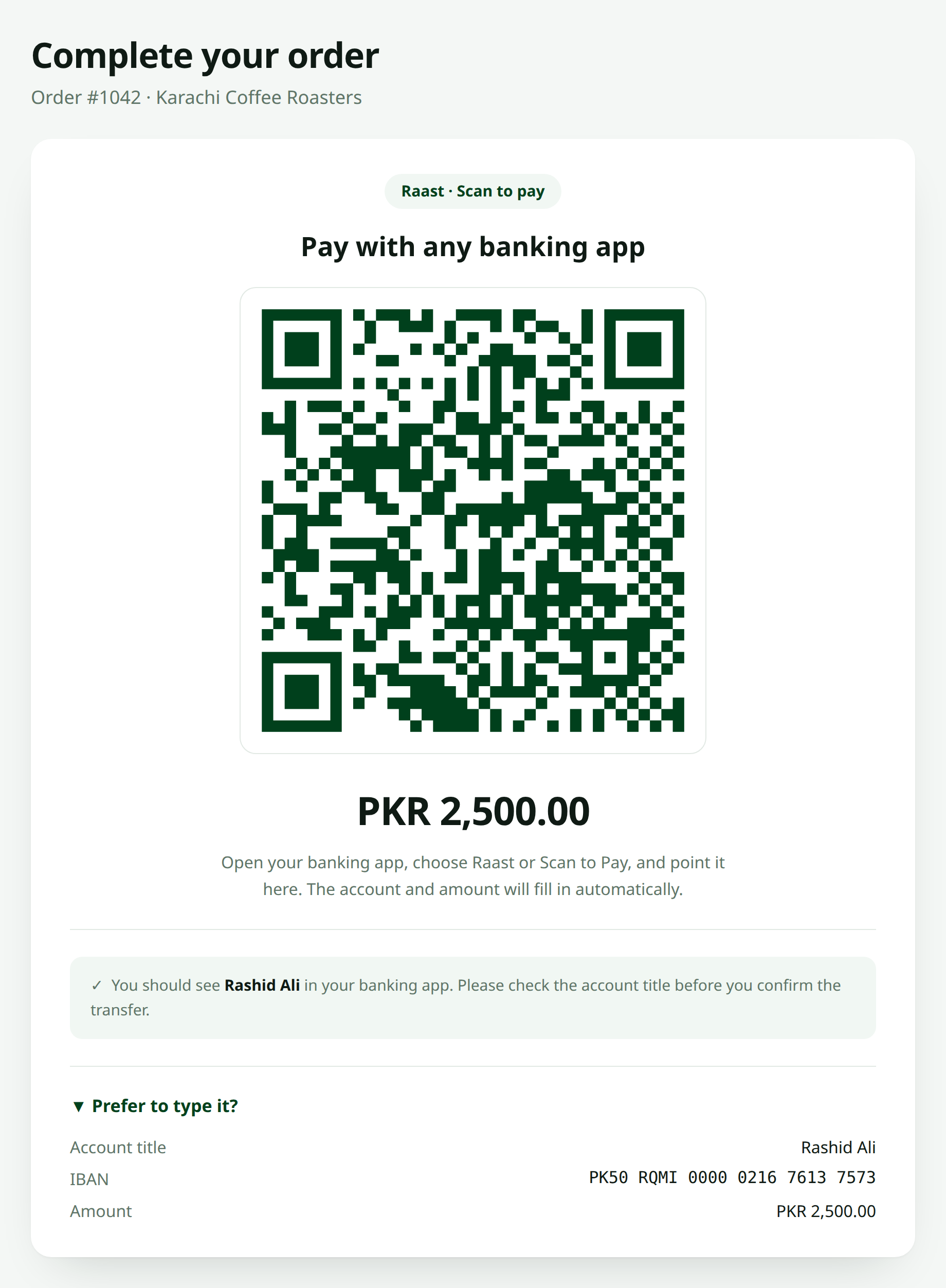
The Component
{{-- resources/views/checkout/payment.blade.php --}}
<div class="rounded-xl border p-6 text-center">
    <h3 class="text-lg font-semibold">Pay with any banking app</h3>

    <x-raast-qr
        :amount="$order->total"
        size="280"
        color="#01411C"
        class="mx-auto my-5"
    />

    <p class="text-2xl font-bold">PKR {{ number_format($order->total, 2) }}</p>

    <p class="mt-3 text-sm text-gray-600">
        Open your banking app, choose Raast or Scan to Pay, and point it here.
        The account and amount will fill in automatically.
    </p>

    <p class="mt-2 text-sm text-gray-600">
        You should see <strong>{{ config('raast-qr.account_title') }}</strong>.
        Please check it before you confirm.
    </p>
</div>
Offer the Typed Version Too
Not every customer will scan. Some are on a desktop with their banking app on a phone that can't see the screen well, some just don't trust QRs.
<details class="mt-4 text-sm">
    <summary class="cursor-pointer">Prefer to type it?</summary>

    <dl class="mt-3 space-y-1 text-left">
        <dt class="text-gray-600">Account title</dt>
        <dd class="font-medium">{{ config('raast-qr.account_title') }}</dd>

        <dt class="text-gray-600">IBAN</dt>
        <dd class="font-mono">{{ RaastQr::formatIban(config('raast-qr.iban')) }}</dd>

        <dt class="text-gray-600">Amount</dt>
        <dd class="font-medium">PKR {{ number_format($order->total, 2) }}</dd>
    </dl>
</details>
Amounts from Money Columns
If you store money as integer paisa — and you should — convert explicitly rather than letting a float sneak in:
$amount = number_format($order->total_paisa / 100, 2, '.', '');

RaastQr::make()->amount($amount)->toDataUrl();
See Setting the Amount for why this matters.
What Happens After the Scan
Nothing, as far as your application is concerned.
There is no callback
A P2P Raast QR sends money straight to an IBAN. Your application is never told that a payment happened. There's no webhook, no confirmation, no status to poll.
So the checkout flow needs a human step:
<form method="POST" action="{{ route('orders.mark-paid', $order) }}">
    @csrf
    <p class="text-sm">Already paid? Let us know and we'll confirm it.</p>
    <button type="submit">I've sent the payment</button>
</form>
Then verify against your bank statement before you ship anything. Treat a QR exactly as you'd treat a manual transfer — because that's what it is, just with fewer typos.
Making Payments Traceable
Since there's no reference field, give each order a distinguishable total:
// Add the last two digits of the order id as paisa
$amount = number_format($order->total + ($order->id % 100) / 100, 2, '.', '');
Crude, but it turns a wall of identical PKR 2,500 transfers into something you can actually match.
Made with ❤️ from Pakistan